Most web testing conversations swing between two extremes: manual testing that doesn’t scale, and automation suites that take time to mature.
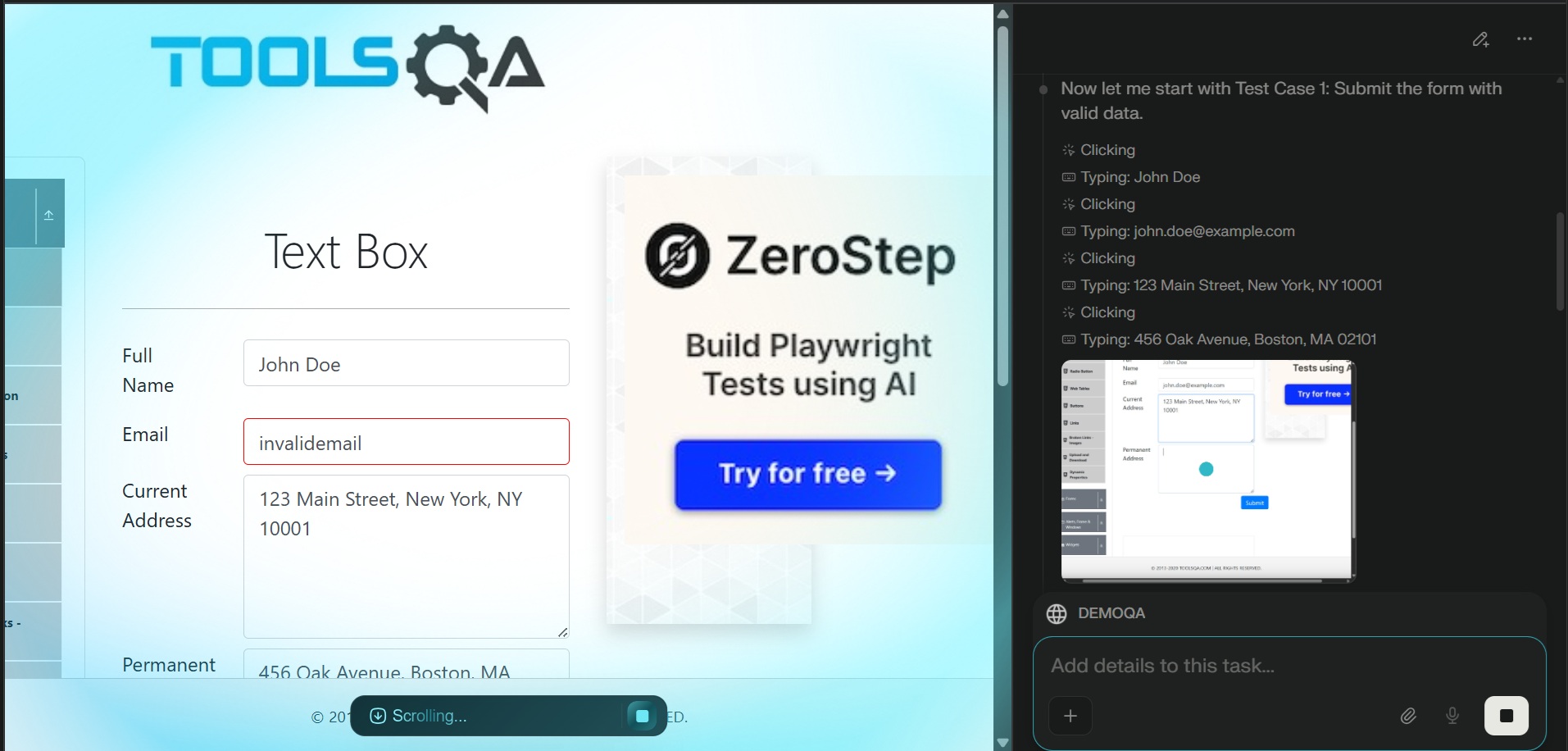
Recently, I experimented with a third option: using an AI-controlled browser as an exploratory testing assistant. This post documents a real experiment using Perplexity Comet on a public demo application and explains where this approach fits in a modern testing strategy.
The Test Target
I used the public DEMOQA Text Box page: https://demoqa.com/text-box
This page is deceptively simple but realistic enough to mimic enterprise UI behavior:
- Multiple mandatory fields
- Email validation
- Dynamic rendering of submitted data
- No page refresh on submit
- User-controlled input rendered back to the UI
Exactly the kind of form-heavy UI we see in internal tools and admin consoles.
The Experiment
Instead of writing Playwright or Selenium scripts, I asked Comet to execute the following test cases end to end:
- Verify successful form submission with valid data and correct rendering of submitted values
- Verify email validation with invalid input
- Verify behavior when mandatory fields are left empty
- Verify the form submits without refreshing the page
- Verify malicious input is rendered as plain text and not executed (basic XSS check)
The key difference here is how the tests were executed.
I didn’t script DOM selectors, assertions, or waits. I described intent, not implementation.
Test Execution Summary
Test Case 1: Valid Submission
- Entered valid name, email, and address data
- Form submitted successfully
- Output section dynamically displayed all submitted values
- No validation issues
Result: PASSED
Test Case 2: Invalid Email Validation
- Entered
invalidemailwithout@or domain - Email field showed red error styling
aria-invalid="true"confirmed validation failure- Form did not submit
- Previously submitted valid data remained unchanged
Result: PASSED
Test Case 3: Mandatory Fields Empty
- Cleared all required fields
- Attempted submission
- Form did not submit
- Output section was not updated
Interesting observation: No explicit error messages appeared, but submission was silently blocked. This is a UX detail that automation scripts often miss unless explicitly asserted.
Result: PASSED
Test Case 4: No Page Refresh on Submit
- URL remained unchanged throughout
- No navigation events occurred
- Output section appeared dynamically below the form
- Form fields retained values
This confirms proper client-side handling without reloads.
Result: PASSED
Test Case 5: Malicious Input (XSS)
Tested multiple attack vectors:
<script>alert('XSS')</script><img src=x onerror="alert('XSS')"><svg/onload=alert('XSS')>
Results:
- No alerts triggered
- No JavaScript executed
- Output rendered inputs as plain text
This confirms basic output escaping and XSS protection.
Result: PASSED
Why This Was Interesting
All five test cases were:
- Executed sequentially
- Documented clearly
- Reported in a structured, readable format
What stood out was not just execution, but exploration.
The AI didn’t just “run steps”. It:
- Tried edge cases a human tester might skip
- Verified UX behavior, not just pass/fail
- Reasoned about what should and should not happen
This is not traditional automation. It’s closer to a tireless exploratory tester.
Can This Be Done with Playwright or Selenium?
Yes. Absolutely.
Every test above can be implemented using Playwright:
- DOM assertions
- URL stability checks
- Validation class checks
- Dialog interception for XSS attempts
But there’s an important distinction:
Playwright executes what you already know to test. AI browsers help you discover what you didn’t think to test.
Where This Fits in a Real Test Strategy
This approach is not a replacement for automation.
A practical model looks like this:
- Use AI browsers early, when automation is still WIP
- Use them to explore forms, edge cases, UX inconsistencies
- Convert high-value scenarios into Playwright tests
- Lock those tests into CI
Think of it as:
- AI for discovery
- Automation for regression
Final Thoughts
AI-controlled browsers won’t replace test frameworks. But they can significantly reduce the time between: “the feature is ready” and “we understand how it breaks”.
For form-heavy enterprise applications, that gap is often where the most expensive bugs hide.
This experiment convinced me that AI browsers are not just productivity tools. They are thinking testers that never get tired.
If you’re already writing Playwright, this doesn’t compete with your setup. It complements it.
And that’s the interesting part.